Best Practices for Kubernetes RBAC
Secure Kubernetes with RBAC: grant minimal roles, avoid wildcards, audit policies, use admission controllers, and manage RBAC as code.

Kubernetes RBAC (Role-Based Access Control) is a powerful tool for managing access to cluster resources. It operates on the principle of least privilege, ensuring users and workloads have only the permissions they need. Here's a quick overview of what you need to know:
- Roles & ClusterRoles: Define permissions for resources. Roles are namespace-specific, while ClusterRoles apply cluster-wide.
- RoleBindings & ClusterRoleBindings: Assign Roles to users, groups, or ServiceAccounts within a namespace or across the cluster.
- Subjects: Permissions are granted to Users, Groups, or ServiceAccounts.
Key Best Practices:
- Grant Minimal Permissions: Start with the lowest privilege and add only what's necessary.
- Avoid Wildcards: Explicitly define resources and actions to prevent unintended access.
- Audit Regularly: Review permissions to eliminate redundant or risky configurations.
- Disable Unnecessary API Access: Use
automountServiceAccountToken: falsefor Pods that don't need it. - Combine RBAC with Admission Controllers: Enforce detailed rules beyond RBAC's scope.
RBAC is essential for securing Kubernetes clusters, but it works best when combined with other tools like NetworkPolicies and admission controllers. Regular audits and automation can help maintain a secure and efficient setup.
RBAC in Kubernetes: Role-Based Access Control Explained | Kubernetes Security Tutorial
Core Components of Kubernetes RBAC
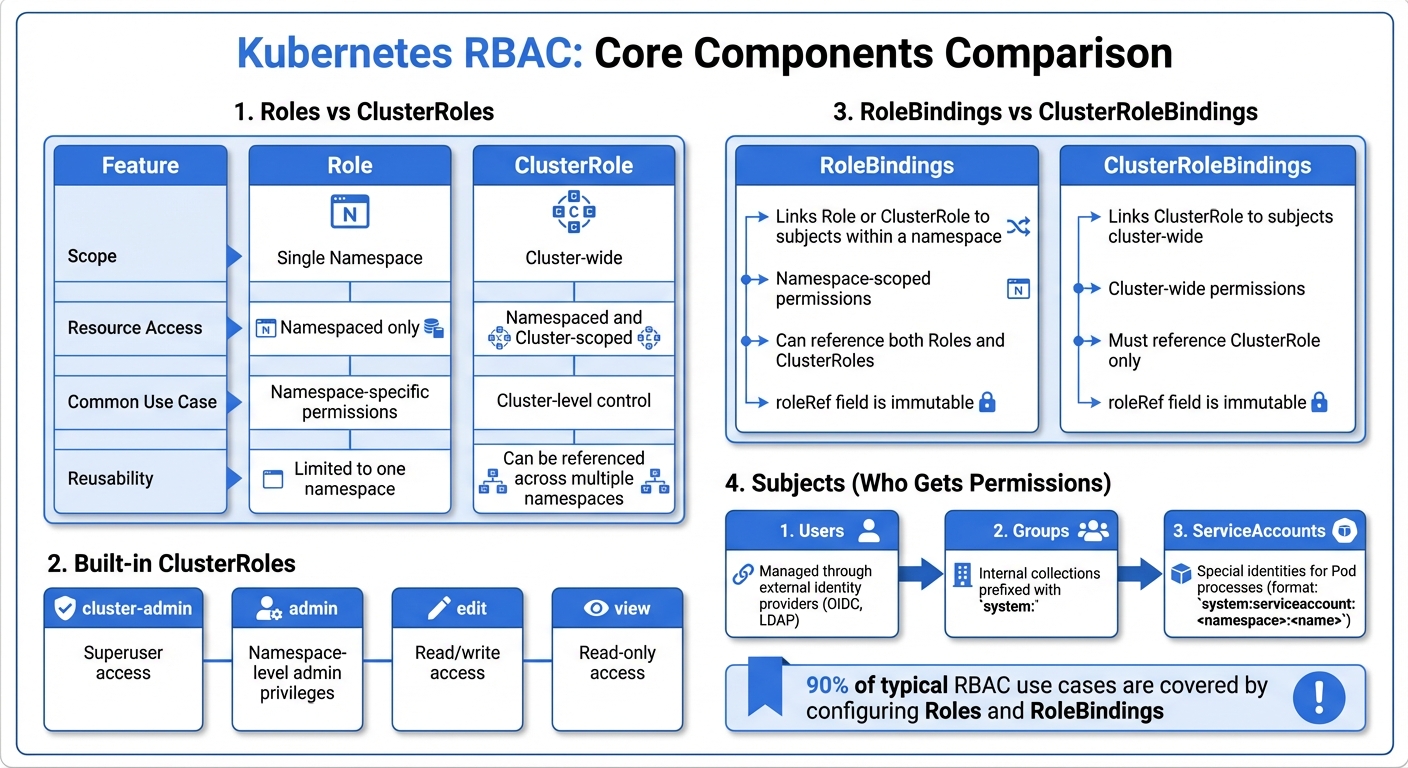
Kubernetes RBAC Core Components Comparison: Roles vs ClusterRoles and RoleBindings vs ClusterRoleBindings
RBAC in Kubernetes revolves around three main parts: Roles, Bindings, and Subjects. Grasping how these elements work together is crucial for setting up secure access policies.
Roles and ClusterRoles
A Role defines permissions within a single namespace. It specifies which actions (like get, list, or create) are allowed on particular resources, such as Pods, Services, or ConfigMaps. The key here is that a Role's permissions are confined to its namespace.
On the other hand, ClusterRoles operate across the entire cluster. They can grant access to both namespaced and cluster-scoped resources, including Nodes, Namespaces, and PersistentVolumes. ClusterRoles are also necessary for non-resource endpoints like /healthz. One of their strengths is reusability - you can define a ClusterRole (e.g., a view-only policy) once and apply it across multiple namespaces using RoleBindings, avoiding repetitive configurations.
| Feature | Role | ClusterRole |
|---|---|---|
| Scope | Single Namespace | Cluster-wide |
| Resource Access | Namespaced only | Namespaced and Cluster-scoped |
| Common Use Case | Namespace-specific | Cluster-level control |
Kubernetes comes with four built-in ClusterRoles:
cluster-admin(superuser access)admin(namespace-level admin privileges)edit(read/write access)view(read-only access).
In practice, configuring Roles and RoleBindings covers about 90% of typical RBAC use cases.
With this foundation, the next step is understanding how bindings tie these roles to specific subjects.
RoleBindings and ClusterRoleBindings
"RBAC is the glue that connects Users to Actions. Without it, your authenticated user is just a person standing in the lobby with no keys to any doors." - Kubernetes Guide
RoleBindings link a Role or ClusterRole to specified subjects within a namespace. For cluster-wide permissions, ClusterRoleBindings are used, and they must reference a ClusterRole. The roleRef field in a binding is immutable, meaning you’d need to delete and recreate the binding to change the associated role.
A common best practice is to define a ClusterRole once and reference it in namespace-specific RoleBindings. This approach reduces redundancy and keeps configurations clean. Properly binding roles is essential to enforce the principle of least privilege, ensuring users and processes only have access to what they truly need.
Subjects: Users, Groups, and ServiceAccounts
Roles and bindings are only part of the equation - permissions need to be assigned to the right subjects.
RBAC assigns permissions to three types of subjects:
- Users: Managed through external identity providers like OIDC or LDAP.
- Groups: Internal collections prefixed with
system:. - ServiceAccounts: Special identities for Pod processes.
One notable group, system:masters, is a hard-coded superuser group that bypasses all RBAC checks. Membership in this group grants unrestricted access, which cannot be revoked through bindings.
ServiceAccount usernames follow the format system:serviceaccount:<namespace>:<name>, while their groups use the prefix system:serviceaccounts:. For better security, it’s a good idea to create unique ServiceAccounts for specific workloads instead of relying on the default ServiceAccount. This ensures more precise permission management and tracking.
Best Practices for Implementing Kubernetes RBAC
Securing your Kubernetes cluster requires careful planning and implementation of Role-Based Access Control (RBAC). Here’s how you can do it effectively.
Enforce the Principle of Least Privilege
Start by granting only the bare minimum permissions to users and ServiceAccounts. A good starting point is the built-in view role, which provides read-only access to most objects while excluding Secrets, reducing the risk of credential exposure. If additional permissions are needed, increment them gradually and only as necessary.
For better control, assign permissions at the namespace level using RoleBindings rather than ClusterRoleBindings. This approach limits the potential damage if an account is compromised. Be particularly cautious with permissions related to creating Pods or Deployments. Granting these permissions can indirectly expose all Secrets and ServiceAccounts in the namespace.
"Ideally, minimal RBAC rights should be assigned to users and service accounts. Only permissions explicitly required for their operation should be used." - Kubernetes Documentation
Avoid assigning superuser roles unless absolutely necessary. Dangerous verbs such as escalate, bind, and impersonate should be restricted, as they can allow users to bypass security measures and elevate their privileges. For workloads that don’t require API access, disable automountServiceAccountToken in Pod specifications to reduce exposure.
Finally, eliminate wildcard permissions to tighten resource access.
Avoid Wildcard Permissions
Wildcard (*) permissions may seem convenient, but they come with significant risks. They grant access not just to current resources but also to any new resources added to the cluster in the future, including custom resource definitions or APIs. This can cause unintended access without anyone noticing.
"Using wildcards in resource and verb entries could result in overly permissive access being granted to sensitive resources." - Kubernetes Documentation
The same principle applies to the verbs field. Wildcards here can unintentionally allow actions like patch, deletecollection, or delete, which most workloads don’t need. Even worse, they might include critical verbs like escalate or impersonate, opening up privilege escalation risks. Instead, explicitly define the API groups, resources, and verbs required. Use the resourceNames field to narrow access to specific instances, such as a particular ConfigMap, rather than granting access to all instances in a namespace.
Audit RBAC Policies Regularly
Even with strict permissions in place, regular audits are crucial. Over time, RBAC configurations can drift as users leave, workloads change, and permissions accumulate. Without periodic reviews, redundant or risky entries can go unnoticed, potentially leading to privilege escalation. For example, a deleted user’s RoleBinding might remain active, and if a new user with the same name is created, they could inherit the old permissions.
Focus audits on high-risk areas. Check for custom bindings to system:unauthenticated, system:authenticated, or system:anonymous, as these could grant unintended access to anyone reaching the API server. Look for wildcard permissions and dangerous verbs like escalate, bind, and impersonate. Enable Kubernetes audit logging to track all API activity - this provides a detailed log of actions, which is invaluable for spotting unauthorized access attempts. Use tools like kubectl get clusterrolebindings -o json | jq ... to identify problematic bindings, and consider leveraging Open Policy Agent (OPA) to enforce security policies automatically.
Advanced RBAC Strategies for Scaling and Automation
As your Kubernetes clusters grow, managing Role-Based Access Control (RBAC) effectively becomes critical. By adopting group-based access, code-managed policies, and automation tools, you can ensure consistency and scalability.
Use Groups for Efficient Access Management
Kubernetes doesn’t include a native User object. Instead, it relies on external authenticators like Okta, Azure AD, or Google Groups to provide usernames and groups. Rather than creating individual RoleBindings for each user, you can streamline access by mapping external identity provider groups directly to Kubernetes roles. For instance, you could bind an Azure AD group like "dev-team" to an edit role within a specific development namespace. This way, team membership is managed externally, and access updates automatically when group membership changes.
"Use group memberships managed in your identity provider to map users to roles in Kubernetes, providing a scalable way to manage access." - KubeOps
Pair this approach with namespace isolation to further enhance security. By segregating resources into namespaces based on teams or environments (e.g., development, staging, production), you can limit the potential impact of security incidents. Additionally, defining a ClusterRole once and referencing it in namespace-specific RoleBindings avoids duplicating Role objects across namespaces, simplifying management.
Mapping groups to roles not only reduces complexity but also integrates seamlessly with policies managed as code.
Manage RBAC Policy as Code
Storing RBAC configurations as YAML files in Git provides a single source of truth. This setup allows for version control, audit trails, and easy rollback if necessary.
"Treat RBAC configurations as code – version control your RBAC definitions to keep track of changes and facilitate rollbacks if needed." - KubeOps
To ensure these configurations are consistently applied, you can use tools like kubectl auth reconcile in your CI/CD workflows. This command synchronizes RBAC manifests with your cluster, automatically handling updates or recreations when roleRef changes. For CI/CD pipelines, it’s best to use dedicated ServiceAccounts with specific permissions rather than default accounts. Additionally, for workloads that don’t require API access, set automountServiceAccountToken: false to minimize unnecessary permissions.
Once your RBAC policies are managed as code, the next step is automating their deployment to maintain consistency across environments.
Automate RBAC with Tools
Automation tools can take code-managed RBAC policies to the next level, ensuring consistent deployment and updates across clusters. Tools like Helm and aggregated ClusterRoles are particularly useful for scaling RBAC.
Helm allows you to package RBAC resources within charts, ensuring they are deployed consistently across different environments. By including an rbac.create flag in the values.yaml file, users can easily toggle the creation of RBAC resources. You can also use helper templates to dynamically generate ServiceAccount names, keeping RBAC and ServiceAccount configurations cleanly separated.
Aggregated ClusterRoles simplify permission management by grouping multiple ClusterRoles into one. Using label selectors, these roles automatically update when new ClusterRoles with matching labels are added. Additionally, integrating external identity providers via OIDC or LDAP shifts user management to a centralized directory, reducing administrative overhead. Tools like Spacelift provide visualization and policy enforcement for infrastructure as code, while Kubernetes Operators can handle the lifecycle management of RBAC policies directly within the cluster.
| Tool/Framework | Primary Function for RBAC | Scaling Benefit |
|---|---|---|
| Helm | Packaging and templating | Standardizes RBAC across multiple releases and environments |
| OIDC/LDAP | External identity management | Offloads user management to centralized directories |
| Aggregated Roles | Permission grouping | Automatically updates combined roles with new sub-roles |
| GitOps/CI-CD | Policy enforcement | Ensures RBAC manifests are automatically applied and audited |
RBAC Limitations and Additional Security Measures
To ensure your Kubernetes clusters remain secure, it's crucial to recognize where RBAC falls short and layer in additional controls.
When RBAC Isn't Enough
RBAC is a solid foundation for access control, but it has its blind spots. For starters, Kubernetes RBAC doesn’t support "deny" rules. If one role grants a permission, there’s no way to override it with another role. This makes it tricky to create exceptions for specific users within a group. Additionally, RBAC lacks context-awareness - it doesn’t account for factors like time of access, source IP, or the sensitivity of the data being accessed.
"RBAC authorization is crucial but cannot be granular enough to have authorization on the Pods' resources... the only granularity is the API verbs on the resource itself." - Kubernetes Security Checklist
Another limitation is RBAC's broad granularity. It controls actions at a high level but doesn’t allow restrictions on specific resource fields. For example, while RBAC can permit a user to create a Pod, it can’t prevent that Pod from running as a privileged container. This gap leaves room for privilege escalation. Permissions like pods/exec, nodes/proxy, or the escalate and bind verbs are particularly risky, as they can lead to direct privilege escalation paths, bypassing many standard safeguards. Moreover, granting access to create workloads often inadvertently grants access to sensitive resources like Secrets, ConfigMaps, and PersistentVolumes.
Combine RBAC with Admission Controllers
To address RBAC’s limitations, admission controllers step in by enforcing detailed, content-specific rules. While RBAC decides who can perform what, admission controllers focus on how actions are carried out. They evaluate API requests after authorization and can modify or reject them based on security policies.
| Feature | Kubernetes RBAC | Admission Controllers |
|---|---|---|
| Primary Function | Authorization (Who can do what) | Policy Enforcement (What is allowed) |
| Logic Type | Additive only (Allow-list) | Mutating (Modify) or Validating (Reject) |
| Granularity | Coarse (Resource level) | Fine (Field/Content level) |
| Timing | Before Admission Control | After Authorization, before Persistence |
For example, the PodSecurity admission controller enforces namespace-level policies like "Baseline" or "Restricted", blocking Pods from requesting dangerous privileges such as running as root or mounting the host filesystem. The NodeRestriction plugin ensures that a kubelet can only modify its own Node and Pod objects, limiting the impact of a compromised node. To secure container images, an ImagePolicyWebhook ensures only pre-approved, scanned images are allowed to run. Additionally, ResourceQuota and LimitRanger controllers prevent users from overloading cluster resources, addressing denial-of-service risks that RBAC alone cannot manage.
Prevent Lateral Movement in Clusters
While strict RBAC policies can limit the damage from breaches, they can’t stop attackers from moving laterally within a cluster. To mitigate this, disable unnecessary API access by setting automountServiceAccountToken: false for Pods that don’t need it. Since RBAC only governs API-level access, use NetworkPolicies to restrict pod-to-pod communication. Start with a "deny-all" ingress and egress policy for each namespace, then explicitly allow only the traffic that’s required.
Further harden your cluster by using Taints, Tolerations, and NodeAffinity to isolate sensitive workloads from less trusted ones. In cloud environments, block Pod access to the cloud metadata API (169.254.169.254) to prevent attackers from stealing cloud credentials. Finally, deploy Seccomp, AppArmor, or SELinux profiles to limit the system calls a process can make, reducing exposure to kernel-level exploits. For even stronger isolation, consider sandboxed runtimes with RuntimeClass, which provide better protection from the host than standard container runtimes.
Conclusion
Kubernetes RBAC serves as your first layer of defense against unauthorized access, but it requires ongoing attention. Always grant only the permissions users or services need. Stick to namespace-scoped Roles, steer clear of wildcard permissions, and avoid adding users to the system:masters group.
"RBAC isn't just an optional feature within K8s. Implementing it correctly helps you minimize breaches, manage complex configurations, and enforce compliance requirements." - Wiz
While RBAC is a powerful tool, it doesn't address every security challenge. Strengthen your defenses by combining RBAC with other measures like admission controllers, NetworkPolicies, and hardened service accounts (e.g., disabling automountServiceAccountToken). Think of your RBAC configuration as living code - manage it with GitOps workflows, conduct regular audits, and use tools like kubectl-who-can to verify who has access to critical actions.
Take action now to secure your cluster. Confirm that RBAC is enabled, review roles for excessive permissions, and automate audits to identify and address privilege escalation risks. A well-implemented RBAC setup can stop breaches in their tracks or limit their impact.
Stay vigilant. Regularly update and refine your RBAC policies to keep up with the growth and evolution of your infrastructure. A strong RBAC foundation, combined with continuous monitoring and updates, will help ensure your cluster remains secure.
FAQs
What steps can I take to keep my Kubernetes RBAC policies secure over time?
To keep your Kubernetes RBAC policies secure over time, it's important to audit and update permissions regularly. This practice ensures they stick to the principle of least privilege, reducing the chances of roles having more access than they actually need.
You should also look into automating policy enforcement. Tools designed for this can validate configurations and help prevent mistakes that might lead to vulnerabilities. On top of that, monitor access and activity within your cluster continuously. This approach helps you spot and resolve potential security concerns as they emerge.
By staying on top of these tasks, you can better protect your Kubernetes setup and maintain its security over the long haul.
What’s the difference between a Role and a ClusterRole in Kubernetes?
In Kubernetes, Roles are designed to manage permissions for resources within a single namespace. This means they are limited in scope and apply only to the specific namespace they are created in.
On the flip side, ClusterRoles operate at the cluster level. They can grant permissions that apply across all namespaces or to cluster-wide resources, making them ideal for broader access needs.
If you're managing access for resources confined to one namespace, Roles are the way to go. However, if you need permissions that extend across multiple namespaces or involve cluster-wide resources, ClusterRoles are the better choice. The decision hinges on the scope of access you’re looking to define.
Why is it important to avoid using wildcard permissions in Kubernetes RBAC?
Avoiding wildcard permissions in Kubernetes RBAC is important because they can open the door to serious security risks. These permissions give overly broad access, potentially allowing unauthorized actions or privilege escalation.
To keep your Kubernetes environment secure, stick to the principle of least privilege. This means assigning only the exact permissions each role needs to perform its tasks. By doing so, you reduce the risk of unauthorized access and maintain tighter control over your system.